FAQs
How do I invite someone to the Upside dashboard?
- Click your company’s name at the top of the navbar, and select Company Settings.
- Click the Invite Team Member button.
- Enter the new user’s email address, and select the desired Role.
- Admin: all permissions, including inviting new users and managing connections.
- Member: all permissions, but cannot invite new users.
- The new user will receive an invitation via email to create an account.
How do I get in touch with the Upside team?
Our team is primarily available via Slack, with a shared channel set up for every customer. Contact your Upside rep if a channel isn't set up yet for your company.
For all the ways to reach us — Slack, Microsoft Teams, and email — see Support.
Does Upside support Single Sign-On (SSO)?
Yes — Upside supports SSO for organizations that require it. SSO allows your team to log in using your company's existing identity provider, so there's no need for separate passwords.
To get SSO enabled for your organization, reach out to your Upside point of contact and they'll handle the setup.
How do Enhanced Buying Groups work?
Our logic detects buying group relationships when the following conditions are true:
- There is at least one contact role added to the opportunity in the CRM.
- Another contact either a) participates in an email thread, or b) joins a meeting with one of the contact roles defined in the CRM.
- The shared email or meeting interaction happens while the opportunity is open, including 30 days before and after.
How do I run the same analysis across many deals?
Running the same analysis across a large set of deals or accounts is very doable. The one thing to know is that a single agent working through many entities in sequence tends to drift, so the first deal and the last can come back in different shapes. Here's how to keep results consistent at scale:
-
Nail the single-deal prompt first. Whatever the scale, start by working with your AI on a prompt that takes one deal as input and returns exactly the output you want. Iterate until a single result looks right, and that becomes the unit you run across the whole set.
-
Then choose how to scale it:
- Subagents (self-serve): instruct the AI to run the prompt with subagents, ideally one per deal, or in small batches of around five. Each subagent runs your validated prompt fresh, so results stay consistent. Best for sets up to a few dozen.
- Deep Research (team-assisted): Deep Research is built for exactly this. It orchestrates your prompt across an entire set of entities for you. Best for large sets. Today the Upside team sets the run up on your behalf; triggering it directly from the MCP is on the roadmap.
A set of 70-100 can go in either direction. Smaller sets are a great fit for subagents, larger sets are where Deep Research earns its keep. Not sure which way to go? Share your single-deal prompt with the Upside team and we'll help you decide.
What are bids vs. engagements?
Engagements are touchpoints representing customer and prospect contacts (inbound).
Bids are touchpoints from your own team (outbound).
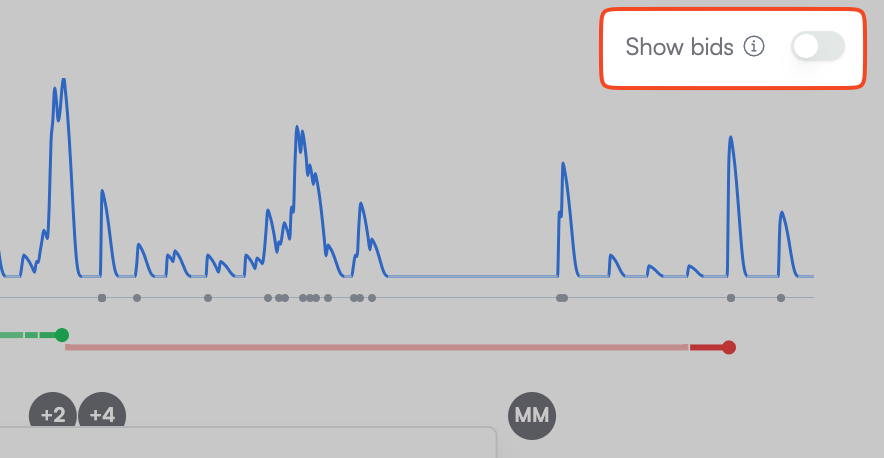
The primary way to view bids vs. engagements is through a toggle at the top of the Navigation Minimap in the Account Explorer. Use this to show both bids and engagements so you can see how spikes in inbound activity correlate with spikes in outbound activity.
Updated 27 days ago